Tonic Textual is a sensitive data redaction platform that you can use to protect your unstructured free-text data. Textual identifies sensitive values contained in free-text files and makes it easy to redact those values or synthesize net new values to take their place. The platform enables you to create safe, shareable versions of your free-text files in which the sensitive values are fully redacted ("Michael" becomes "NAME") or are replaced with a similar value ("Michael" becomes "John").
With just a few clicks, you can embed Tonic Textual into your data and ML pipelines to provide you with realistic, de-identified text data that’s safe to use to train models, for LLMOps, and to build data pipelines. Using Textual, you can safely leverage your text data and practice responsible AI development while staying compliant with evolving data handling regulations.
In this post, we'll talk about how Textual uses trained models to identify sensitive values in your files, and how you can create your own custom entity types to use in addition to Textual's collection of built-in types.
How Tonic Textual uses models
How does Tonic Textual look for sensitive values in your files? To find the values that you might want to redact or replace, Textual uses a variety of techniques, in particular Named Entity Recognition.
By default, the models recognize a fixed set of built-in entity types.
Each built-in entity type represents a specific type of value, such as an identifier, name, or location.
An entity type starts with a sample set of typical values, along with examples of how the values are used in context. For example, this entity type identifies spoken languages:
During the training process, Textual uses these values and templates to learn how to identify that type of value when it scans a file.
Why do you need custom entity types?
Tonic Textual's built-in entity types identify a wide range of value types, including names, ages, locations, and identifiers.
But what if your files contain values that aren't covered by the built-in types? For example, your files might contain terms that are specific to your industry or profession. In the healthcare industry, files might contain names of conditions or diseases. Or you might assign a specific type of identifier to accounts and users.
To handle these other types of values, you can create custom entity types in Textual.
After you define a custom entity type, you can tell Textual to use that entity type in its analysis of the files in any dataset.
Customize data redaction and synthesis for AI model training.
Unblock your AI initiatives and build features faster by securely leveraging your free-text data.
How do you create custom entity types?
In Tonix Textual, the Custom Entity Types page displays the list of custom entity types. To define a custom entity type, you can either:
- Provide a set of regular expressions.
- Define and train a model.
Regex-based custom entity types
A regex-based custom entity type uses one or more regular expressions to identify values of that type. If a value matches one of the regular expressions, then Textual identifies it as belonging to that entity type.
Regex-based custom entity types are useful when the entity values have a standard format. For example, your organization uses an identifier that is always in the format ABC followed by 5 numbers. To identify those values, you could create a regex-based custom entity type with the regular expression ^ABC\d{5}$.
Model-based custom entity types
To define a model-based custom entity type, you train a model to identify the entity values.
A model-based entity type is useful when the values are identified more by context than by format. For example, for an entity type that identifies the names of health conditions, it would not be possible to set up regular expressions that identify the values.
You iterate over text-based guidelines that identify the entity type values in a smaller set of data, then use a larger set of data to train one or more models.
The process to define and train a model includes the following steps:
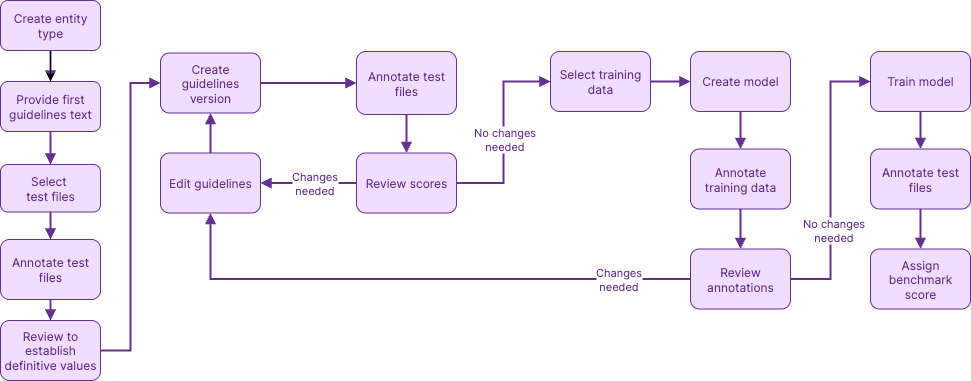
- Select and annotate test files.
Identify the entity values that are in a small set of test files.
- Iterate over model guidelines.
Guidelines provide instructions for how to identify the entity values. A simple example is "Names of diseases and health conditions".
Textual scores the guidelines based on how well they identify the values in your test data, and provides suggestions for improving the guidelines.
- Assemble training data.
The training data is a much larger set of data that contains at least 1,000 example values.
- Create and train models.
When you create a model, you select the guidelines to use. After Textual uses the model to annotate the training data, you can start the training process.
After the training, the model is scored based on how well it identifies the values in the original text data.
When you have a model that you're happy with, you identify it as the active model for the entity type. Once you have an active model, you can enable the custom entity type for your datasets.
Recap
To quickly recap, Tonic Textual uses trained models and Named Entity Recognition as tools to find sensitive values. Each model identifies a set of entity types.
Textual comes with a set of built-in entity types that represent a range of value types, such as names and identifiers. If your files contain other values that aren't included in the built-in entity types, then you can create custom entity types to also identify and redact or synthesize those values.
Regex-based custom entity types identify values based on whether they match one of the configured regular expressions for the entity type.
For model-based custom entity types, you use sets of test and training files to define model guidelines and train a model to identify the entity values.
To learn more about safely de-identifying sensitive data in free-text, connect with our team, or sign up for an account today.