How to mock the PayPal API with Tonic Fabricate
Why PayPal’s API slows down development momentum
Integrating PayPal should be a straightforward checkbox for modern apps, but in practice it often becomes a drag on engineering velocity. The sandbox and API experience, in particular, introduces a lot of friction.
Common pain points developers run into include:
- Fragmented onboarding between the developer dashboard, sandbox accounts, and live accounts, with different URLs and credentials to keep straight.
- Flaky or delayed sandbox webhooks that make it hard to trust end‑to‑end tests; events like payment completions may not arrive at all, or arrive inconsistently.
- The need for manual browser interaction in the checkout flow, which blocks automated integration tests and CI pipelines.
- Limited control over edge cases: it is difficult to deterministically simulate failures, disputes, or unusual payment flows from test code.
- Debugging noise from PayPal-specific behaviors that are unrelated to the core business logic you are trying to validate.
While I was testing out in PayPal’s “interactive” sandbox API playground, I literally ran into an issue where my sandbox credentials weren’t even recognized:
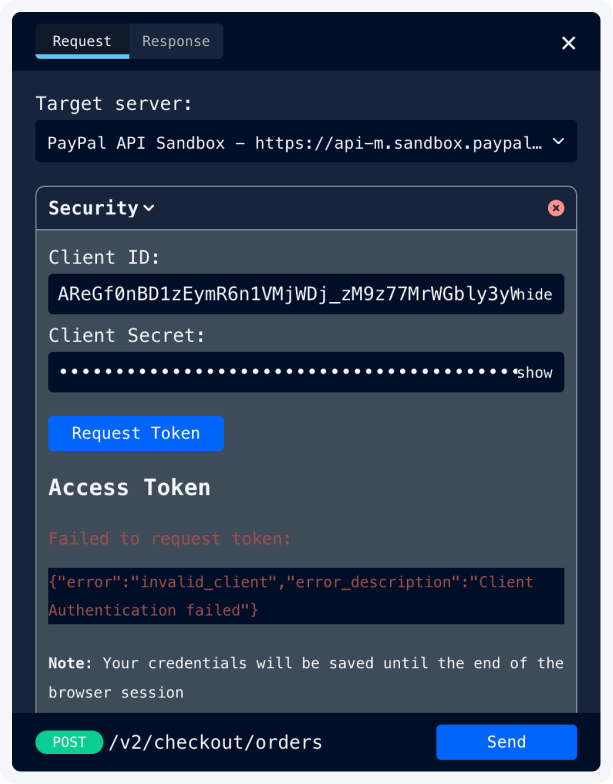
All of these issues share a common theme: you are forced to depend on a remote, stateful, third-party system just to validate your own application logic. The result is broken feedback loops, slower POCs, and developers spending more time fighting the integration than actually building products.
This is exactly the gap Tonic Fabricate helps close. In the article below, I’ll outline how Fabricate’s ability to spin up mock APIs solves these common challenges, in just a few short prompts. Prefer to see it in action? Check out my video on mocking PayPal’s API or get started for yourself with a free account at fabricate.tonic.ai.
How Tonic Fabricate helps unblock PayPal integrations
Tonic Fabricate is a synthetic data platform that also gives you a powerful mock API layer on top of that data. Instead of pushing every test through the actual PayPal sandbox, you can stand up a local-ish, deterministic PayPal-like API in minutes.
At a high level, Fabricate helps in three ways:
- Mock the PayPal API endpoints you rely on (orders, captures, webhooks, etc.) using a familiar Express-style route DSL.
- Back those endpoints with realistic synthetic data that mimics your production schemas without exposing any real customer data.
- Call your mock API over HTTPS with a simple Bearer token, treating it like any other external service from your app or test suite.
Because you own the mock API definition, you can explicitly codify edge scenarios that are painful to reproduce in PayPal’s sandbox: forced failures, delayed events, partial refunds, and more. This turns previously flaky, manual test paths into fast, deterministic automated tests.
Mock the PayPal API with Tonic Fabricate in 2 Steps
1. Plan the mock API in Fabricate
In the Fabricate UI, you describe what you want to build in plain language. I kept my prompt straightforward:
That's it. Fabricate takes that description, reasons about the data model, and gives you a plan to review before building anything.
2. Review and build
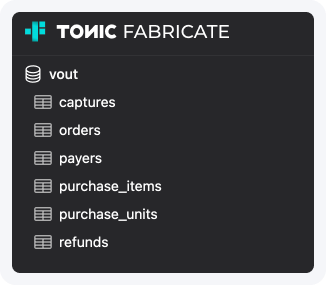
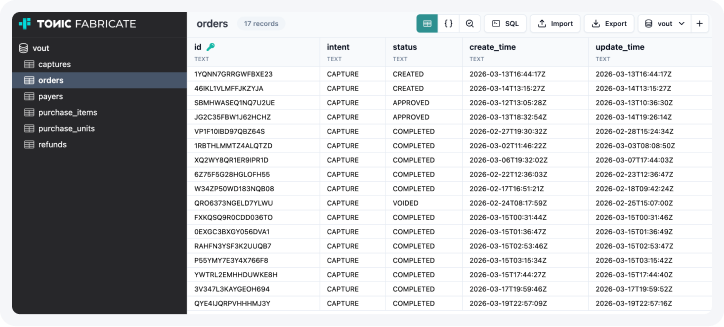
Once the plan looks right, you kick off the build. Fabricate handles the database schema, generates synthetic relational data to populate it, and spins up the API endpoints. Rinse and repeat until it matches what you need.
The end result is an API playground — your endpoints, your data, working reliably every time you hit them.
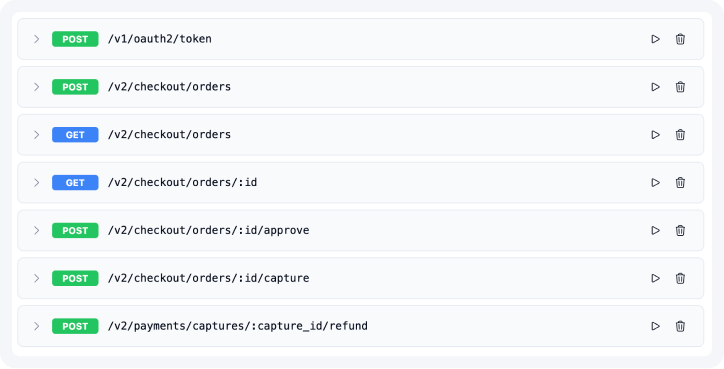
Building ✔️out (Check-out) on the Mock PayPal API
To validate this end to end, I built a small checkout app called ✔️out (Vout) that integrates with the mocked API.
Architecture overview
Vout has three main pieces:
- A frontend catalog and checkout UI built with Svelte: product selection, cart, and a "Pay with PayPal" button.
- A Shopify integration that pulls products and cart state via the Storefront GraphQL API.
- A checkout abstraction that talks to the fake "PayPal".
The key design decision: the backend never calls PayPal directly. It goes through a thin client that accepts a base URL — swap in the Fabricate mock URL during development, point it at real PayPal when you're ready to ship. The app doesn't know the difference.
Gotchas: In order to interact with the Tonic Fabricate Mock API, you’ll need to pass the Tonic API key in the header using Bearer Auth. To get an API key, visit https://fabricate.tonic.ai/account and click on “Create New API Key”. Authenticate by sending an Authorization: Bearer <API_KEY> header with each request.
Completing the POC loop
Well, that seemed a little too simple. PayPal’s API requires authentication which is something that our initial POC lacked, so simply go back to Tonic, and ask Fabricate to add in the auth layer.
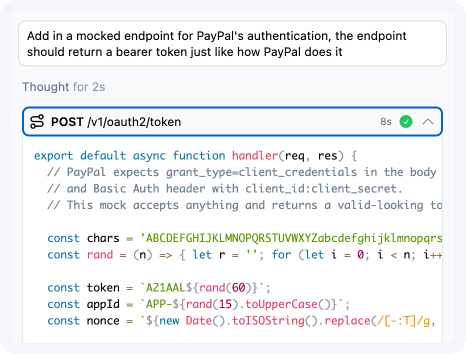
Once Fabricate completed the /v1/oauth2/token API endpoint, you now have a full end-to-end PayPal API flow where you’d go through a token exchange first before accessing all the operational endpoints.
The results
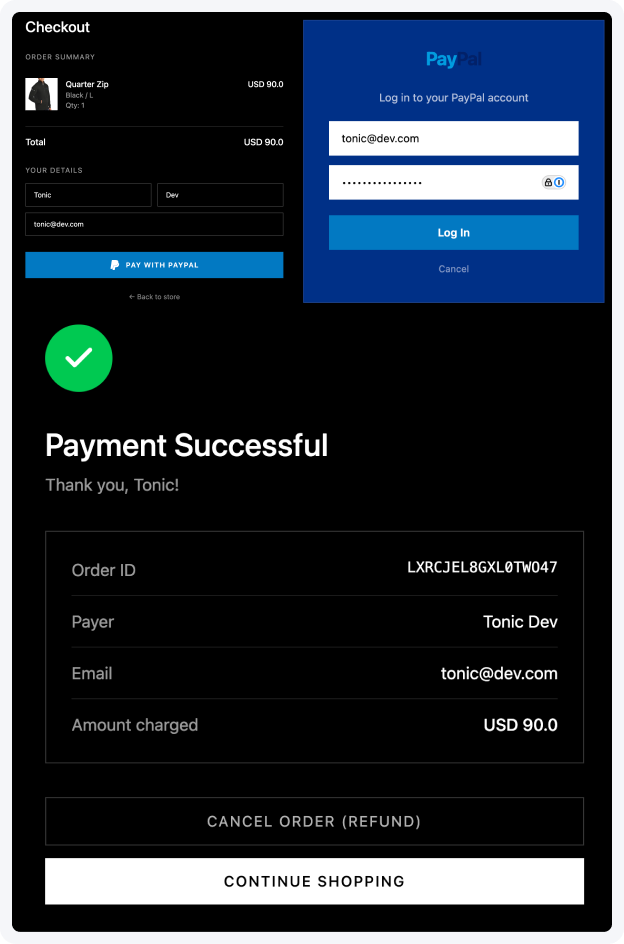
By front-loading this mock-based integration, Vout gained several benefits without touching the real PayPal sandbox:
- The ability to spin up an app in minutes with all the API calls hooked up.
- End-to-end tests for the checkout flow interacting with all necessary API endpoints, CI-optimized so you can focus on building a robust application.
- Edge cases can be encoded into additional mock routes, not left to chance.
- The product team can iterate on the checkout UX, order lifecycle, and downstream business logic knowing that the integration surface with “PayPal” is stable and deterministic.
When the time comes to switch to the actual PayPal sandbox or production environment, the only change is the base URL and credentials in the PayPal client configuration. The application logic itself remains the same.
Check out the Vout app and sign up for Tonic Fabricate to build your own mock API.